
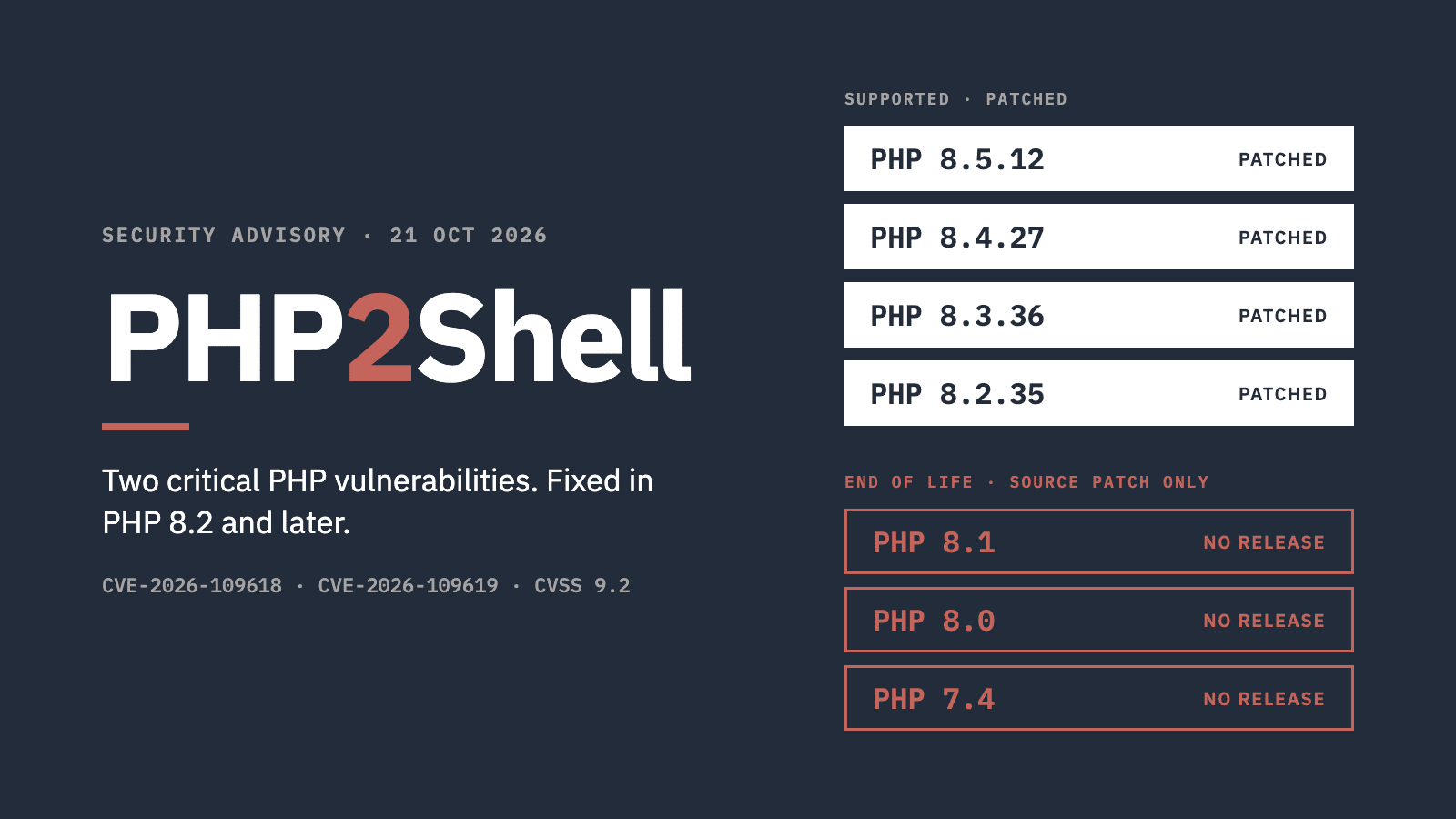
The PHP security team released fixes for two critical vulnerabilities today, 21 October 2026. The fixed versions are PHP 8.5.12, 8.4.27, 8.3.36 and 8.2.35, and php.net advises everyone to update immediately.
PHPMageddon from PHP2Shell – What Happened?
Both vulnerabilities are in PHP itself. Each is rated 9.2 (critical) on the CVSS v4.0 scale, and they are tracked as CVE-2026-109618 and CVE-2026-109619. Both can allow an attacker to run code on the server without logging in.
The first is triggered by a specially crafted form or upload request that makes PHP run out of memory at the wrong moment. The second involves information left over from one request being picked up by the next. On some server setups, the first can be exploited before WordPress has run a single line of code.
Details leaked on 20 October, ahead of the planned disclosure, and the issue has been named “PHP2Shell”. By the morning of 21 October, Patchstack was reporting active attacks from several hosting companies.
The fix does not come through WordPress or plugin updates. It is a PHP update on the server.
Sites on old PHP versions
PHP 8.1, 8.0 and every 7.x release are past end of life, and the PHP project has not released new versions for them. Given the severity, the PHP security team did publish minimal patches for PHP 7.4, 8.0 and 8.1. These are source code, not releases. A site on one of those versions is protected only if its host builds the patch in. As Private DevOps noted ahead of the release, end-of-life versions normally get no fix from php.net at all.
Packaged fixes are arriving unevenly. On the evening of 21 October, Meow Apps listed fixes for cPanel, for PHP 8.2 to 8.5 on Plesk for Linux, and for Ubuntu and Debian 13. Debian 12 and Red Hat had none yet. Hosts on older platforms, or still offering old PHP versions, are likely to be the slowest to patch.
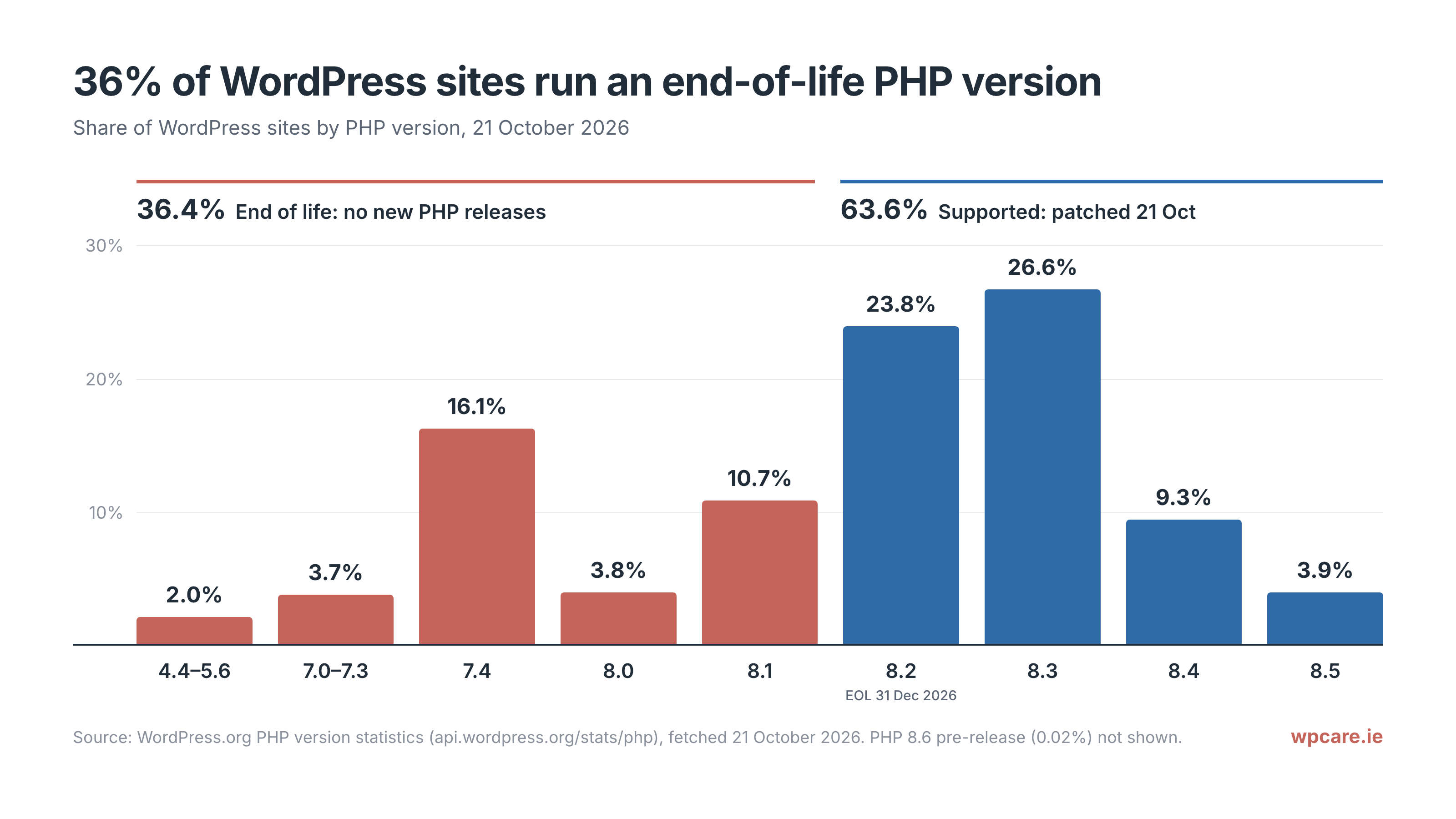
According to WordPress.org’s own figures, around 36% of WordPress sites still run PHP 8.1 or older, and about 20% run PHP 7.x.
Many of those sites are on old PHP for a reason. An old theme, an abandoned plugin or custom code written years ago can stop working on newer PHP. For those sites the fix is not a quick server update but a compatibility project, and it has to happen while the vulnerability is being exploited.
Old code also makes the second vulnerability easier to exploit. Fatal errors and warnings that an attacker can trigger are part of how it works, and code that doesn’t suit the PHP version it runs on tends to produce both.
PHP 8.2 itself reaches end of life on 31 December 2026.
For Small Sites that Might not need WordPress
For some older sites, PHP isn’t needed at all. A brochure site that rarely changes can run as a static site, with no database and no PHP to patch. If a simple, safe site is all you need, a service like AI Sites, which we also run, provides static sites of this kind.
What it means for our clients
PHP has been updated across all WP Care servers, and every site we host runs PHP 8.2 or later.
No action is required from our clients.
Self-managed sites
- Check which PHP version your site runs (Tools → Site Health → Info → Server).
- Ask your host when they will apply the update, and get a clear answer once they have. Some hosts patch without changing the version number, so the number alone doesn’t confirm it.
- If your site runs PHP 8.1 or older, ask your host whether they have applied the backported patch, and about moving to a supported version. Test the site on the newer version before switching.
- Take a backup first.
- Don’t install unofficial “fix” plugins or code snippets. Firewall rules from Cloudflare and others reduce exposure but are not a fix.
- Updating PHP doesn’t remove anything an attacker installed before the fix. Check for unknown administrator users, plugins you don’t recognise, and
.phpfiles inwp-content/uploads.
If you’re not sure whether your site will run on a current PHP version, get in touch or see our managed WordPress care plans.
